

Could a familiar-looking inverter code mean something different on your system? Common solar inverter error codes aren’t universal: the same number or label can mean different things across brands and models. An unfamiliar alert can leave you unsure whether solar generation has stopped, communication has dropped or a safety issue needs attention.
That uncertainty is understandable. A code is a useful clue, not a confirmed diagnosis. This guide explains the main fault categories, what information to record and which safe first steps to take. You’ll also learn what to avoid, including opening the inverter or touching electrical wiring, and why the manufacturer’s instructions should guide any reset.
You’ll see how grid, DC, AC, internal, communication and safety-related alerts can differ, and when a qualified technician can help identify the cause. If an alert persists, GES ENERGY provides inverter repairs, maintenance and warranty assistance across Australia, including Victoria. The inverter model and a clear record of the alert can make the next step more straightforward.
Key Takeaways
- Common solar inverter error codes point to possible fault categories, but their exact meanings depend on the inverter’s manufacturer and model.
- Compare the inverter display with monitoring data and generation readings to help distinguish a system alert from a communications issue.
- Record the full code, when it appeared and any changes in system performance to give a technician useful diagnostic information.
- Use the manual for your exact inverter model. Don’t touch electrical components or attempt a reset unless its instructions permit it.
- Persistent, recurring or safety-related alerts may need professional diagnosis, repair or warranty assistance.
How to read common solar inverter error codes without guessing
An inverter error code is a model-specific alert about a condition the system has detected. It may relate to the inverter, its electrical connections, the grid or communication with monitoring software. Treat the alert as a starting point for investigation, not a repair instruction.
An inverter code is a clue, not a universal diagnosis. A number, symbol or flashing-light pattern can mean different things on different manufacturers’ models. Even similar-looking displays may indicate different conditions. General lists of common solar inverter error codes can help you recognise broad fault categories, but they can’t replace the documentation for your exact unit.
This video shows examples of alerts and troubleshooting for one product range. Use it as general background, not as a guide to interpreting a different model’s code.
Solar inverters convert the electricity generated by solar panels into a form used by your home or business and, where applicable, supplied to the grid. For a basic overview of their role and types, see Solar Inverter. This context can help you understand the equipment, but the manufacturer’s code reference is the source to use when interpreting an alert.
Find the inverter model and exact warning
Look for the manufacturer and model on the inverter’s external label, in the monitoring platform or in the owner documentation. Don’t remove a cover or move the unit to find identifying details. Record the complete code, any displayed wording and the indicator-light pattern, including which lights are steady or flashing. A clear photo can preserve the exact message for later reference.
Check the manufacturer’s code reference
Use the manual for your inverter’s exact model. Check whether its instructions apply to the firmware version shown in your monitoring platform or system records. A broad category, such as a grid or communication alert, describes the type of condition that may be involved. It doesn’t establish what a particular number means on your unit.
Match the full code and displayed wording against the manufacturer’s reference before drawing conclusions. Don’t assume a code in another brand’s guide applies to your inverter, even if the number is identical. If the manual doesn’t explain the alert clearly, keep your recorded details together and seek qualified diagnosis rather than testing electrical components yourself.
Common solar inverter error code categories and what they can indicate
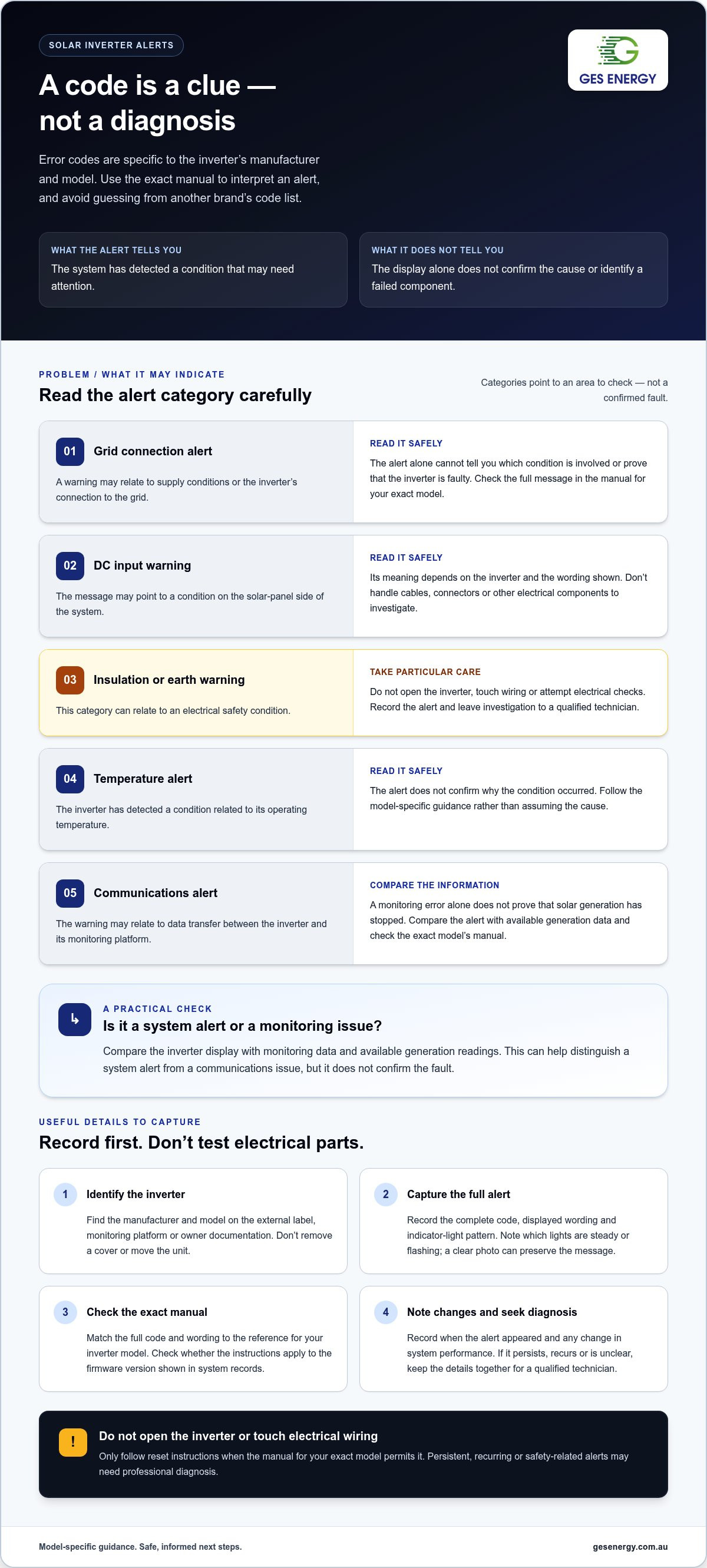
Common solar inverter error codes often point to a broad category of condition, rather than identifying a confirmed failed component. Categorising an alert can help you understand what area may need attention, but it can’t establish the cause on its own. A grid warning, for example, may relate to the electricity supply or the inverter’s grid connection. The same category can cover different conditions on different systems.
The exact inverter manual is the reference for interpreting a displayed code. Use it to check the full message and understand what the alert means for your model. Treat these categories as a guide to the type of issue the inverter may have detected, not as a diagnosis or an instruction to inspect electrical equipment.
- Grid connection: The alert may relate to supply conditions or the inverter’s connection to the grid. The display alone won’t tell you which.
- DC input: A warning may point to a condition on the solar-panel side of the system. Its meaning depends on the inverter and the message shown.
- Insulation or earth: These warnings can relate to electrical safety conditions. Don’t touch wiring, connectors or other electrical components. Leave investigation to a qualified technician.
- Temperature: A temperature alert means the inverter has detected a condition related to its operating temperature. Follow the model-specific guidance rather than assuming the cause.
- Communications: The alert may relate to data transfer between the inverter and monitoring platform. A monitoring error alone doesn’t prove that solar generation has stopped.
Grid, DC input and insulation-related alerts
Grid and DC alerts can involve different parts of the system, so don’t jump from the category to a conclusion about a component. A grid-related message, for example, doesn’t establish that the inverter is faulty. An insulation or earth-fault warning calls for particular caution: don’t open the inverter, handle cables or attempt electrical checks. Record the alert and follow the manufacturer’s safety instructions.
Temperature, communication and performance alerts
A temperature message identifies a condition the inverter has detected, but it doesn’t confirm why it occurred. A communication warning may affect the information shown in an app or monitoring portal without proving that the panels have stopped producing electricity. Compare the alert with available generation data, then check the manual for your exact model. Don’t rely on a code example from another inverter unless its manufacturer documentation applies to your equipment.
If a code persists, recurs or relates to insulation or earthing, professional diagnosis can help establish whether the issue is in the inverter or elsewhere in the system. Solar inverter repair support can help you move from an alert to an informed next step.
Is the fault in the inverter, grid connection or monitoring system?
An alert can appear on the inverter, in the monitoring app or in both places. Comparing these sources with generation data helps you describe what’s happening, but it can’t confirm the cause. An observed symptom is evidence to record, not a confirmed fault diagnosis.
Monitoring data and inverter alerts show different parts of the picture. An app may stop receiving information even while the inverter display shows no warning. An inverter alert may also coincide with a change in recorded generation. Neither observation alone proves whether the inverter, grid connection or monitoring system is responsible.
| What you observe | Monitoring status | Generation data | Sensible next observation |
|---|---|---|---|
| The inverter displays a warning | Data may still appear, or may be interrupted | Check whether recorded output changed around the alert time | Record the exact display message and note whether it remains or changes |
| No inverter warning is visible | The app reports a connection or data issue | Recent readings may be missing or delayed | Note whether the issue appears only in the monitoring platform |
| The inverter shows a grid-related alert | The platform may show the same alert or a data gap | Compare the timing of any change with the alert | Record when it began and whether it recurs |
| The inverter and app show different information | Monitoring status may not match the local display | Available data may cover different time periods | Save both messages and note when each was checked |
Compare inverter display messages with monitoring data
First, note whether the inverter itself displays an alert or whether the issue appears only in the app or portal. Compare recent production records with the same period on earlier days, allowing for differences in available data and operating conditions. Don’t assume weather explains a change, or that missing app readings mean generation has stopped. Record when the message began and whether it returns, changes or disappears.
Consider grid and site context without diagnosing
Supply conditions can be relevant to a grid-related alert, but a display message doesn’t establish that the grid is at fault. If the alert persists or returns, a qualified technician can assess the inverter and its connection. For Victorian sites, note the location and timing of the alert alongside the display and monitoring records. This gives a technician useful context without relying on assumptions about local network conditions.
These comparisons help you report symptoms clearly, not identify a failed part. Common solar inverter error codes still need to be interpreted against the exact inverter model and manufacturer guidance. Don’t inspect wiring, isolators, panels or electrical enclosures to investigate a discrepancy. Stick to information visible on the display and monitoring platform, and arrange professional assessment if alerts persist or production data raises concern.
Safe next steps when a solar inverter displays an error
A clear record of the alert helps a technician investigate without asking you to test electrical equipment. Common solar inverter error codes can point to different conditions, so focus on what you can safely read, record and report. Don’t remove covers, handle cables or attempt electrical tests. Only follow a reset procedure if the manual for your exact inverter model permits it and the alert’s instructions allow it.
Use this sequence to gather useful information without trying to diagnose or repair the system yourself:
- Read the display from a safe position. Note the full code, message and indicator-light status. Don’t approach or touch the inverter if you see damage or suspect an electrical hazard.
- Record the inverter details. Use the external label, monitoring platform or owner documentation to note the make and model. Don’t open the unit to find its identification label.
- Capture the timing and pattern. Write down when the warning appeared and whether it is continuous, intermittent, recurring or changing. Note whether production data appears reduced or unavailable.
- Check the monitoring information. Record any app or portal message and whether its status agrees with the inverter display. Keep a photo of the display if you can take one safely.
- Report the information. Share the model, complete alert, date and time, indicator status, monitoring message and any recent changes to the system or its operation.
What you can safely record
Keep the information together so the sequence is clear. Record whether the alert appeared once or repeatedly, whether the message changed and whether generation data changed at the same time. Include any recent system changes you already know about, such as a change to monitoring access. Don’t remove covers, handle cables, inspect isolators or panels, or attempt electrical tests to gather more detail.
When to stop troubleshooting and arrange assessment
Stop and keep people clear if the inverter or nearby equipment appears damaged, or if the message suggests an insulation, earth or other safety-related fault. Arrange qualified assessment for persistent or repeated alerts, unexplained shutdowns or warnings that return after following permitted manufacturer guidance. Don’t keep resetting the system to suppress a message. Follow the inverter’s safety instructions and don’t approach suspected electrical hazards.
GES ENERGY provides solar inverter repairs, maintenance and warranty assistance, including for systems installed by another company. A qualified diagnosis can help determine whether the alert relates to the inverter or another system condition. Arrange solar inverter fault diagnosis to move from recording the warning to assessing the next step.
Solar inverter repairs and warranty support in Victoria and across Australia
Professional diagnosis is appropriate when an alert persists, returns after clearing or relates to electrical safety. It can help establish whether the condition involves the inverter, the grid connection or another part of the system, and whether repair or warranty support may be suitable. A code list alone can’t determine the right remedy.
GES ENERGY provides solar inverter repairs, maintenance and warranty assistance in Victoria and across Australia. Support is available for systems regardless of who installed them. An assessment can help turn information from the display and monitoring platform into a practical next step, without relying on assumptions about what a code means.
Prepare useful information for a repair or warranty assessment
Useful records help make an assessment more focused. Gather the inverter make and model, the complete alert, the system’s approximate age and any installation records you have. Add dated photos of the display and relevant monitoring history only if you can capture them safely from a distance. Don’t open equipment or approach a suspected electrical hazard to collect more information.
- The full warning as shown, including any wording or indicator-light pattern
- The date and time it appeared, and whether it has recurred or changed
- Monitoring messages and available production history around the same period
- Known changes to the system or its operation before the alert appeared
These details don’t confirm a fault, but they help a technician understand what you observed. Diagnosis determines the appropriate repair or warranty pathway. Eligibility and next steps depend on the assessment and the relevant manufacturer’s terms, so don’t assume an alert automatically means a component needs replacement or qualifies for a claim.
How GES ENERGY supports inverter repairs
GES ENERGY can assist with inverter repairs and manufacturer warranty claims, including for systems installed by another company. Maintenance support can also help assess system health and recurring performance concerns. This gives you a clearer basis for deciding what needs attention, rather than treating a display message as a complete diagnosis.
Based in Melbourne, GES ENERGY serves customers across Australia, with a strong focus on Victoria. If an alert is persistent, recurring or safety-related, keep clear of electrical components and arrange a qualified assessment. For other ongoing warnings, share the information you’ve recorded so the system can be assessed against its actual condition and the relevant inverter documentation.
If you need help with a continuing inverter alert, explore GES ENERGY’s solar inverter repair and warranty assistance. If the fault raises broader questions about your setup, reviewing your solar and battery system as a whole can also help clarify how its components work together.
Turn an inverter alert into a clear next step
Common solar inverter error codes can point to a condition to investigate, but the exact model manual and a professional assessment give the alert useful context. If a warning persists or raises a safety concern, keep clear of electrical equipment and pass on the details you recorded.
GES ENERGY reports more than 10 years in renewable energy and over 2,500 successful installations. Its installers are SAA-accredited, and its in-house teams hold ISO certifications. This experience supports a careful approach to assessing inverter alerts and identifying an appropriate repair or warranty pathway.
Take the next step with the inverter model and full warning to hand. Arrange solar inverter repair or warranty support with GES ENERGY and move towards a clearer understanding of your system. With the right assessment, you can make informed decisions about what happens next.
Frequently Asked Questions
What are the most common solar inverter error codes?
Common solar inverter error codes usually relate to grid connection, DC input, insulation or earthing, temperature, or communications. The code numbers and messages depend on the inverter make and model, so a generic online list may not match your system. For example, a communications warning may concern data transfer rather than generation. Use your manufacturer’s code reference to interpret the alert before deciding what it means.
Can I reset my solar inverter when an error code appears?
Only reset the inverter if the manual for your exact model permits it and its instructions apply to the alert shown. A reset may clear a temporary message, but it doesn’t establish what caused the warning. Don’t repeat resets to make an alert disappear or operate switches as a test. If the manual’s directions are unclear, or the warning returns, stop and arrange a qualified assessment.
Are solar inverter error codes the same for every brand?
No. Manufacturers use different codes, messages and indicator patterns, and similar-looking alerts may refer to different conditions. Even a code list for another model from the same brand may not apply to your unit. Check the model and, where relevant, firmware information in the owner documentation or monitoring platform, then refer to the matching manufacturer guide. Avoid diagnosing a fault from a number alone.
What should I do if my solar inverter shows an earth or insulation fault?
Keep clear of the inverter and its wiring, and arrange assessment by a qualified technician. Don’t open covers, touch cables or try to locate an earth fault yourself. Record the displayed warning from a safe position and note when it appeared. If there is visible damage or you suspect an electrical hazard, keep other people away and follow the manufacturer’s safety instructions while arranging professional help.
Can a grid issue cause a solar inverter error?
Yes, an inverter may display an alert related to grid supply conditions or its grid connection, but the message alone can’t establish that the grid is the cause. Note whether the alert appears on the inverter, in monitoring or in both, and record when it starts. If it persists or recurs, share those observations with a qualified technician for assessment rather than inspecting electrical connections.
Can GES ENERGY repair a solar inverter installed by another company?
Yes. GES ENERGY provides solar inverter repairs and warranty assistance for systems installed by other providers. Its service includes Melbourne, Geelong, Ballarat, Bendigo, Shepperton, Melton, Mildura, Wodonga, Traralgon, Wangaratta, Horsham, Sale, Colac, Echuca, Ararat, Portland, Swan Hill, Benalla and Maryborough, as well as customers across Australia. Share your inverter details and alert to help with the next assessment step.


