

A clicking inverter doesn’t automatically mean it has failed. A few relay clicks during start-up or shutdown are usually normal. Persistent clicking, error messages, repeated shutdowns or falling output can point to a fault. Consider these solar inverter failure symptoms alongside what the inverter displays and when the change occurs.
When your solar system’s performance changes, it’s reasonable to wonder whether the inverter is responsible. Some faults affect generation; others interrupt monitoring or indicate a grid connection issue. Either way, don’t open the inverter enclosure or attempt internal electrical repairs.
This guide explains five signs to watch for, how to interpret common sounds and power changes, and when to arrange a professional assessment. It also covers safe observations that can help clarify what’s happening. The advice applies across Australia, with a local focus for homeowners in Melbourne and elsewhere in Victoria. Understanding your system’s behaviour helps you make informed decisions about its performance.
Key Takeaways
- Learn how to tell normal start-up or shutdown sounds from clicking that may signal a fault.
- Understand what a blank display or loss of inverter power could indicate, and which safe checks can help narrow it down.
- Recognise how ventilation, dust and heat can affect inverter performance.
- Use changes in solar production to spot possible faults, including issues that may affect only part of an array.
- Know when warning signs call for a qualified technician and why internal inverter repairs aren’t a homeowner task.
1. Why does my solar inverter make a clicking noise?
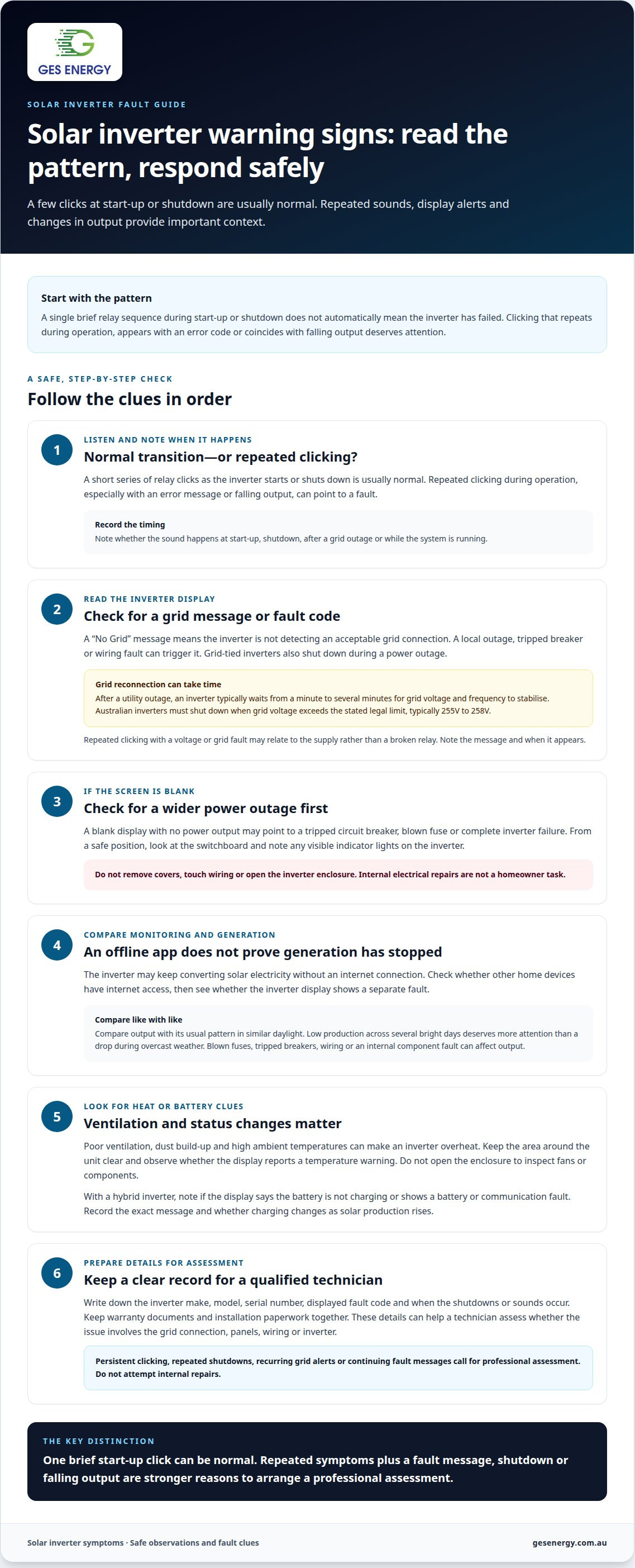
A few relay clicks as a solar inverter starts or shuts down are usually normal. The internal relay connects or disconnects the unit from the grid, so a short sequence at either transition doesn’t automatically indicate a fault. Clicking that repeats during operation, continues alongside an error code or coincides with falling output deserves attention. These can be solar inverter failure symptoms, but timing matters.
Grid synchronisation can explain clicking during connection or reconnection. A grid-tied inverter checks the electricity supply’s voltage and frequency before exporting power. It must align its output with the grid’s waveform, the pattern of alternating voltage over time. A distorted waveform or unstable supply can interrupt synchronisation, prompting the relay to disconnect and try connecting again. A displayed grid fault alongside repeated clicks is a clearer warning than a click at start-up alone.
After a utility outage, a grid-tied inverter typically waits from a minute to several minutes for grid voltage and frequency to stabilise before reconnecting. Australian inverters must shut down when grid voltage exceeds the stated legal limit, typically 255V to 258V. Repeated clicking with a voltage or grid fault may therefore relate to the supply, rather than a broken relay. Note the displayed message and when the sound occurs; a technician can use both details to assess the fault.
An inverter showing as offline in a monitoring app doesn’t prove that generation has stopped. The inverter may keep converting solar electricity without an internet connection, while a Wi-Fi issue prevents monitoring data from reaching the app. Check whether other home devices have internet access and whether the inverter display shows a separate fault. If the screen reports normal operation, a lost connection may explain missing app data better than repeated relay clicks.
With a hybrid inverter, battery charging issues can also appear alongside clicking or status changes. The display may show that the battery isn’t charging or report a battery or communication fault. Solar production, battery charge settings and the inverter’s displayed status can help distinguish a charging issue from a grid connection fault. Record the exact message and whether charging changes as solar production rises. Repeated component switching or persistent fault codes call for professional diagnosis.
Heat-related clicking needs attention when it occurs alongside repeated shutdowns. Poor ventilation, dust build-up and high ambient temperatures can make an inverter overheat; cooling fans or internal electronics may also be failing. Keep the area around the unit clear and observe whether its display reports a temperature warning. Don’t open the enclosure to inspect fans or other components. If the sound continues during normal operation, arrange an assessment by a qualified technician.
2. What are the most common solar inverter faults?
In Australia, inverter failure can stem from a tripped breaker, blown fuse, wiring issue or failed internal component. Grid voltage outside the inverter’s accepted range can also trigger a fault and stop export. Some shutdowns are normal: a grid-tied inverter switches off during a power outage, and solar generation stops at night. The display message and shutdown timing help distinguish these causes.
A blank display with no power output may point to a tripped circuit breaker, blown fuse or complete inverter failure. First, check whether there’s a wider power outage, then look at the switchboard from a safe position. Don’t remove covers or touch wiring. If household power is on but the inverter screen remains blank, note the model and any visible indicator lights. This information can help a technician narrow down whether the issue affects the inverter or its supply.
A “No Grid” message means the inverter isn’t detecting an acceptable grid connection. A local outage, tripped breaker or wiring fault can trigger this alert. If it appears during an outage, shutdown is expected for a grid-tied system. If neighbours have power and the message remains, record when it started and any other displayed codes. Frequent shutdowns or recurring grid alerts need assessment, not repeated resets.
Low solar output doesn’t always mean the inverter has failed. Insufficient sunlight can reduce generation, while blown fuses, tripped breakers or internal component faults can interrupt it. Compare the inverter’s output with its usual pattern in similar daylight conditions. For example, low production across several bright days deserves more attention than a decline during overcast weather. A defective maximum power point tracking (MPPT) circuit or incorrect wiring can also reduce energy capture.
Unexpected shutdowns may involve grid conditions, power supply interruptions or an inverter fault. Look for a fault code on the display and record the time, especially if shutdowns happen repeatedly during the day. If the inverter shows no output after the switchboard and DC isolator have been checked, seek professional support. Don’t open its enclosure or work on internal components, even if the screen appears completely off.
Before arranging a warranty claim, gather the inverter’s make, model, serial number, fault code and a brief record of the shutdowns. Keep the warranty documents and installation paperwork together. These details help identify the unit and support the claim process. Follow the inverter manual’s instructions for interpreting a displayed code, but don’t attempt electrical repairs. A clear record helps the technician assess whether the fault involves the grid connection, panels, wiring or inverter itself.
3. Overheating and ventilation
An inverter needs clear airflow to manage heat from converting solar electricity. Poor ventilation, dust build-up and high ambient temperatures can raise its operating temperature. Some units then reduce output or shut down to protect internal components. If your inverter stops during a hot afternoon and resumes later, overheating is one possible cause. Repeated shutdowns, especially alongside an error code, need attention rather than repeated restarting.
Start troubleshooting with an observation, not by opening the unit. From a safe position, note whether the inverter is in direct sun, near a heat source or behind stored items. Check whether plants, boxes or other objects block the space around it. Compare what you see with the clearance and placement guidance in the inverter manual. Keep the area unobstructed, but don’t move the inverter or remove its covers.
Dust can collect around air openings and restrict airflow. In models with cooling fans, dust or a fan fault may reduce cooling. A fan running more often on a warm day can be normal; repeated shutdowns or a fan warning on the display are different signs. Don’t insert tools or fingers into vents. If cleaning appears necessary, arrange professional cleaning rather than disturbing electrical components.
Location affects cooling. An inverter mounted in a hot, enclosed area may struggle more than one in the shade with open airflow. For example, a unit surrounded by stored items in a garage has less room for heat to escape. A shaded, well-ventilated position helps limit heat build-up. Don’t relocate an installed inverter yourself; its wiring and mounting need qualified assessment.
A string inverter may show whether an entire array has stopped producing, while a temperature or over-temperature error code can point to a heat-related interruption. Record the message, time, weather conditions and whether output returns later. This pattern gives a technician useful context. A single restart may clear a temporary fault, but it won’t remove dust, clear blocked airflow or repair a failing cooling fan.
Repeated shutdowns can indicate failing cooling fans or internal electronics. The warning is more concerning when the inverter stops on mild days, shuts down repeatedly or displays the same error after restarting. Follow the model’s manual for any user-level troubleshooting and note the exact code. Don’t keep resetting the unit to force production; recurring faults need diagnosis.
Arrange a professional assessment if overheating warnings persist, the casing appears damaged or shutdowns continue after the surrounding area is clear. A technician can assess airflow, fan operation, internal components and the recorded error code without exposing you to electrical hazards. A shaded, ventilated location and suitable cleaning can address environmental causes; persistent faults may need repair. This helps you address the cause rather than treating each restart as a lasting fix.
4. Reduced or inconsistent energy production
Compare your solar system’s output across days with similar weather and daylight. A cloudy afternoon can lower energy production without indicating an inverter fault. A sustained decline on clear days is more concerning, particularly if the inverter display shows a warning or unusual operating status. Record the date, weather and displayed output so a technician can distinguish a persistent pattern from changing conditions.
One example is a homeowner whose daily solar production dropped by 30% for three consecutive days. That change is a useful reason to investigate, not proof of a failed inverter. Check whether the drop continues under comparable sunlight, and note any fault messages. A short-lived dip may have a different cause from repeated low production across several clear days.
The pattern across the panels can help locate the problem. A failed microinverter usually affects the panel it serves, while other panels can continue producing. With a string inverter, a fault can affect output from a connected group of panels. A technician can compare system data and test relevant components to identify whether the problem is at one panel, a circuit or the inverter.
Low output can also involve a defective maximum power point tracking (MPPT) circuit or incorrect wiring. MPPT helps the inverter draw usable power from the panels as conditions change. If its readings or operation are faulty, production may fall despite adequate sunlight. Wiring issues can also interrupt energy flow. These faults need technical diagnosis; an output drop alone can’t identify the component responsible.
Zero production has different possible explanations from a gradual decline. Night-time shutdown is expected for a grid-connected solar system, while a daytime outage may point to a tripped breaker, blown fuse or inverter fault. Note whether the display is blank, shows an error code or remains active with no reported output. These details help narrow down the fault without opening the inverter enclosure.
A failed inverter can reduce the solar energy exported to the grid, which may lower feed-in tariff credits. If your home then draws more electricity from the grid, your bill may also rise. The effect depends on how much solar power your household uses directly and how much it exports.
Keep a short production record with daily output, weather conditions and any inverter warnings. If a sharp decline continues across comparable sunny days, or a panel appears to stop contributing, arrange professional testing. Manufacturer monitoring data may help pinpoint when production changed, while an on-site assessment can check the inverter, wiring and affected panels. This evidence supports a more focused repair decision.
5. When should I call a professional to fix my inverter?
Arrange a professional assessment when a fault returns after the checks permitted by the manual, or when the inverter’s behaviour changes without a clear cause. A message that clears once differs from an alert that returns each time the system operates. Note whether the fault appears at start-up, during peak sunlight or after a system change. This pattern helps the technician focus on the operating conditions linked to the problem.
For a recurring grid fault, record when it appears and whether other electrical equipment is affected. A technician can assess the inverter’s settings and hardware; a persistent supply issue may also need attention from the electricity provider. This distinction matters because changing inverter hardware won’t resolve a fault caused by grid conditions. Avoid repeated resets, which can erase useful operating clues without addressing the cause.
A professional assessment can help distinguish an inverter fault from a problem elsewhere in the solar system. The technician can review system behaviour, inspect accessible equipment and test relevant electrical components. For example, an inverter warning alongside normal household electricity use may need a different investigation from a fault coinciding with wider supply disruption. Diagnosis identifies the likely source before repair or replacement is considered.
Ask for the findings and recommended next step to be explained in practical terms. A repair decision can depend on the failed component, the inverter’s condition and whether the fault can be resolved safely. If the manufacturer’s warranty may apply, the assessment and supporting records can help progress a claim. Keep the outcome with your system documents so future technicians can understand what was tested and repaired.
Professional support is especially useful when a fault remains unclear after checking the display and following the manual. Give the technician the fault history, system model and any changes noticed in production or operation. You don’t need to diagnose the cause yourself. Clear observations help narrow the investigation, while electrical testing and repair are work for a qualified professional.
GES ENERGY provides Solar Inverter Repairs & Warranties for inverter faults and warranty assistance. If an error keeps returning or the system needs diagnosis, arrange solar inverter repair support rather than attempting internal repairs. A documented assessment gives you a clear basis for deciding the next step and helps keep the system’s repair history organised.
GES ENERGY: Solar Inverter Repairs & Warranties
GES ENERGY provides Solar Inverter Repairs & Warranties for persistent faults, reduced output or warning messages that need professional attention. A technician can assess the inverter issue and help with the repair or warranty claim process, giving you a clearer path to restoring reliable system operation. Share the inverter model, any displayed error code and when the problem occurs to explain what you’re experiencing.
If your system supports a home, business or off-grid site, resolving an inverter fault can help you understand its effect on your wider energy setup. GES ENERGY also offers Commercial and Industrial Solar and Off Grid Solar Systems.
For inverter repair or warranty assistance, contact GES ENERGY.
Take the next step towards dependable solar performance
Recognising solar inverter failure symptoms gives you a useful starting point, but a clear diagnosis helps you decide what to do next. Record changes in system performance and any fault messages, then share those details when arranging an assessment. This can help focus attention on the issue affecting your system and whether repair or warranty support is appropriate.
GES ENERGY provides Solar Inverter Repairs & Warranties for homeowners and businesses dealing with inverter faults. If your system’s performance has changed or a warning keeps returning, contact GES ENERGY for inverter assistance to discuss the next step. You can move forward with a clearer understanding of your system and the support it needs.
Frequently Asked Questions
What are the most common solar inverter faults?
Common faults include grid connection errors, isolation faults, overheating, wiring problems and failed inverter components. The displayed code describes what the inverter has detected, but may not identify the underlying cause. Record the full code, when it appeared and whether it clears or returns. This fault history gives a technician more useful diagnostic information than a general report that the system “isn’t working”.
Can I reset my solar inverter myself?
Follow a reset procedure only if the inverter manual gives one for your model and there’s no safety warning. Before starting, note the current display message and any lights, as a reset may change what the screen shows. Don’t improvise a switch sequence or reset an inverter with an isolation warning, burning smell or visible damage. If the prescribed procedure doesn’t resolve the issue, stop.
Can a solar inverter be repaired or does it always need to be replaced?
A solar inverter can sometimes be repaired; replacement isn’t automatic. Diagnosis considers the failed component, the inverter’s overall condition, warranty coverage and whether a safe repair is practical. A replacement decision also needs to account for compatibility with the existing panels, battery and system configuration. Ask for the fault diagnosis and recommended remedy to be recorded so you can understand why repair or replacement is appropriate.
Is it the inverter or just the monitoring?
A monitoring fault affects the information you can see, while an inverter fault affects system operation. Compare the app’s last update with the inverter’s own screen and any available generation reading. A changed router, Wi-Fi password or disconnected internet service can interrupt monitoring data. If local readings continue but the app stops updating, investigate the communications link. If the inverter reports an operating fault, the issue needs technical attention.
What does it mean when my inverter shows a ‘No Grid’ error?
A ‘No Grid’ message means the inverter isn’t accepting a grid connection, so it can’t operate in its normal grid-connected mode. If the property has power but the message keeps returning, note when it appears and save a photo of the display. This record can help distinguish a persistent connection problem from a brief supply interruption and support a focused assessment.
When should I call a professional to fix my inverter?
Arrange professional help if the fault returns after the manual’s user-level steps or the display shows a safety warning. A technician can test electrical connections and internal components without you opening the enclosure. Before the visit, gather the inverter model, warranty paperwork and any photos or notes about the fault. This information helps clarify the system’s history and supports repair or warranty assessment.
Why does my solar inverter make a clicking noise?
A relay may click as the inverter changes between connected and disconnected states. A brief sequence at start-up or shutdown differs from repeated clicking while the system should be operating. Note whether the sound coincides with a screen message, a change in output or a particular operating condition. Don’t remove the cover to locate the sound; internal inspection belongs to a qualified technician.
Why is my solar inverter not producing power?
Zero output can result from normal night-time shutdown, low sunlight, a system fault or an interruption elsewhere in the electrical setup. Check the time of day and the inverter’s displayed status, then compare its reported generation with a similar period. If the screen shows a fault or daytime production remains absent, record the conditions. Don’t climb onto the roof or handle solar cabling to investigate.


