

What if a lower generation figure doesn’t mean your solar system is underperforming? If you’re wondering how to read my solar system performance data, start by looking at energy flows rather than judging the system by one number. Your dashboard may show how much electricity your panels generate, how much your property uses, and how much energy moves to or from the grid.
It’s understandable to feel unsure when readings change or don’t seem to match your electricity bill. They may cover different time periods or measure different parts of your energy use. This guide explains the main dashboard readings, how to compare periods fairly, and which patterns may need attention. You’ll also learn what to record before seeking maintenance or inverter repair support, so you can describe a change clearly. These checks apply to solar systems in Melbourne and regional Victoria, as well as elsewhere in Australia.
Key Takeaways
- Learn how to read my solar system performance data by distinguishing power measured in kilowatts from energy measured in kilowatt-hours.
- Check the reading period, units and last-updated time in your inverter display, monitoring app or website before interpreting a figure.
- Compare similar periods and consider seasonal conditions and changes in electricity use before judging a shift in output.
- If a reading seems unusual, check its timestamp, compare equivalent periods and record any continuing pattern.
- System design and ongoing maintenance can support clearer monitoring and informed solar performance checks.
How to read your solar system performance data: start with the energy flows
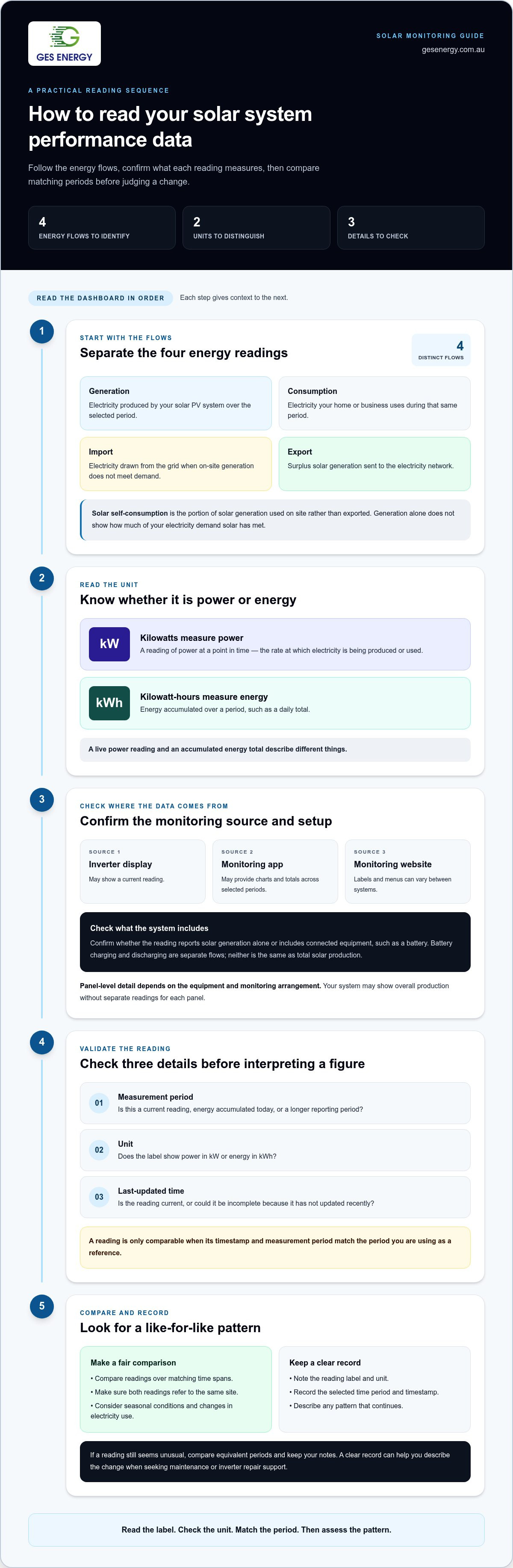
Read a solar dashboard as a picture of electricity moving through your property. Look for four separate flows: energy produced by the solar PV system, energy used on site, electricity imported from the grid and surplus electricity exported to the network. These figures answer different questions. Generation alone doesn’t show how much of your electricity demand solar has met.
Check the unit beside each reading. Kilowatts (kW) measure power at a point in time, or the rate at which electricity is being produced or used. Kilowatt-hours (kWh) measure energy accumulated over a period. A live power reading and a daily energy total therefore describe different things. Solar panels convert sunlight into electricity; the Solar Panel Technology and Efficiency overview explains the basic process.
Dashboard layouts vary by inverter, monitoring setup and connected equipment. Some show energy flows in a diagram; others use separate totals or graphs. If a figure seems unclear, note its label, unit and selected time period before drawing conclusions. Knowing how to read my solar system performance data starts with identifying what each number measures, rather than assuming every system uses the same screen or terminology.
What do solar production and household consumption mean?
Generation is the electricity produced by your solar PV system over the selected period. Consumption is the electricity your home or business uses during that same period. For a useful comparison, make sure both readings cover matching time spans and refer to the same site.
During a sunny part of the day, panels may produce electricity while appliances or business equipment are running. Some generation can meet that on-site demand, while surplus may flow elsewhere. If demand exceeds current solar generation, the shortfall may come from the grid or, where connected equipment allows, a battery. The flow depends on the system and what it measures.
What do import, export and self-consumption readings show?
Import is electricity drawn from the grid when on-site generation doesn’t meet demand. Export is surplus solar generation sent to the electricity network. These readings explain why a property can generate solar power and still use grid electricity, particularly when demand and generation don’t happen at the same time.
Solar self-consumption is the portion of solar generation used on site rather than exported to the electricity network.
For example, a business operating through daylight hours may use solar as it’s generated, with excess exported if generation exceeds demand. Later, when solar production falls but electricity use continues, the site may import power. A battery can change when energy is used or stored, so connected equipment may affect the displayed flows. Not every monitoring setup shows a separate self-consumption figure. You may need to interpret the available readings together.
Where to find reliable solar performance readings in your monitoring system
Your readings may appear on the inverter display, in a monitoring app or on a website, depending on the inverter and monitoring setup. Start with the source you normally use, then check whether it reports solar generation alone or includes connected equipment such as a battery. Systems can present different data and use different menu labels.
Before interpreting a figure, confirm three details: the measurement period, the unit and the last-updated time. A number might describe current output, energy accumulated today or a longer reporting period. If the reading is old or the selected dates don’t match the period you’re comparing it with, the apparent change may reflect timing rather than system performance.
A reading is only comparable when its timestamp and measurement period match the period you’re using as a reference. This matters when reviewing a dashboard after a delay or comparing its figures with records from another source.
How do inverter and app dashboards present system data?
An inverter display may show a current reading, while an app or website may provide charts and totals across selectable periods. Labels and menus vary, so check the screen’s date range and whether the figure is live power or accumulated energy. Panel-level detail depends on the equipment and monitoring arrangement. Your system may show overall production without separate readings for each panel.
- Check whether a live figure is measured in kW or a period total in kWh.
- Confirm the chart covers the intended day, month or other period.
- Look for the latest update time, particularly if readings appear incomplete.
If you’re working out how to read my solar system performance data, don’t assume a blank panel-level view means the system has stopped producing. Your monitoring setup may report at system level only.
How does battery storage change the energy-flow picture?
With a battery connected, solar generation may supply current electricity use, charge the battery or be exported. These are distinct flows. Charging records energy going into storage; discharging records energy leaving storage to supply demand. Neither is the same as the solar system’s total production.
The dashboard may show some or all of these flows, depending on the connected equipment and monitoring arrangement. Don’t infer battery charging or discharging from a generation total alone. If battery information is available, check its label, unit, period and update time before comparing it with solar or household readings.
The U.S. Department of Energy Solar Research provides background on solar technology and performance. GES Energy’s maintenance and inverter repair support can help investigate persistent changes in performance.
How to compare solar system performance without misreading a change
A single low production reading doesn’t tell you whether your solar system has changed. Compare like with like: use the same measurement period and choose days or months with broadly similar conditions. Then look at generation alongside consumption and export. This helps separate a change in what the panels produced from a change in how much electricity the site used or sent to the grid.
Which solar data comparisons are useful?
Daily totals can help you compare days with similar weather and operating conditions. A cloudy day may produce a different result from a clear one without indicating a fault. Check longer periods too, since a sustained pattern is more informative than one unusual day.
For a fair comparison, check:
- The same period length and matching date range.
- Whether cloud cover and daylight conditions were broadly similar.
- Whether household or business electricity use changed.
- Whether generation, consumption and export moved in the same direction.
For example, lower exports alongside similar generation may reflect increased on-site electricity use. Lower generation with similar site use can mean less solar energy was available to meet demand, with imports potentially changing as a result. These readings describe different parts of the energy picture, so don’t treat one figure as a complete measure of system performance.
Use longer-term comparisons to spot recurring patterns, keeping the comparison period consistent. A month-to-month review can be useful if you compare equivalent months across years or periods with similar conditions. Avoid setting a universal production target: system design, location, weather and site conditions all influence the readings. A figure that suits one property may not be a suitable benchmark for another.
How should Victorian solar owners account for seasonal changes?
Solar readings can vary across the year as daylight hours and weather conditions change. For a Melbourne property, compare a period with a similar season rather than treating a winter month and a summer month as equivalent. Regional Victorian sites can experience different local conditions, so your own system and location provide the most relevant reference.
Seasonality affects the context, not the value of monitoring your data. If generation changes, check whether the comparison includes similar dates and conditions, then review consumption and exports to see whether site use shifted. This approach is useful for a home in regional Victoria or a business in Melbourne.
To keep your review consistent, record the date range, generation, consumption, export and any noticeable changes in site use or weather. This is a practical way to understand how to read my solar system performance data without reacting to an isolated number. If a difference continues across comparable periods, you’ll have clearer information for a closer assessment.
What to do when your solar performance data looks unusual
An unexpected reading is a reason to check the data, not immediately assume the system has a fault. Follow a simple sequence: check when the information was last updated, compare it with a similar period, then record what you observe. This helps distinguish a delayed or incomplete display from a change that continues across comparable periods.
- Check the timestamp. Note whether the dashboard has updated recently enough to represent the period you’re reviewing. An older or missing reading may mean the information is incomplete, so avoid drawing conclusions from it alone.
- Compare equivalent periods. Use the same type of measurement and a similar date range, then consider weather and changes in site energy use. A single day is less useful than a pattern across comparable periods.
- Record the pattern. Save the dates and readings, note the conditions and check whether the change appears once or continues.
A difference in the monitoring display isn’t automatically evidence of a performance problem. A timestamp that hasn’t advanced or a gap in displayed information may point to a data issue, while a persistent change across comparable periods may warrant closer assessment. Neither conclusion can be made with certainty from one reading. Keep the readings, period and context together to make the pattern easier to understand.
Which patterns are worth recording for follow-up?
Keep a short record showing what changed and when. Include the displayed figures and units, the date range, weather context and any noticeable change in how the home or business used electricity. Note whether generation, consumption or export changed, rather than writing only that “solar was low”.
Save relevant monitoring screenshots and electricity bills together. Bill dates and monitoring periods may not line up exactly, so record the dates shown on each rather than treating them as a direct comparison. A clear record gives a technician useful context and helps you describe a recurring issue accurately.
When can maintenance or inverter support help?
If an unexplained change continues across comparable periods, a technical assessment may help identify what needs attention. If the inverter display shows a fault message, record it as it appears rather than trying to diagnose it yourself. GES Energy provides maintenance and inverter repair support, as well as assistance with inverter warranty claims.
Keep electrical equipment closed. Don’t open an inverter, switchboard or other electrical equipment, and don’t attempt electrical repairs yourself. A qualified technical assessment is the safer way to investigate equipment concerns.
Organised dates, readings, screenshots and bills can help you explain the issue clearly and support a focused assessment. GES Energy provides solar maintenance and repair support for persistent changes in your solar data.
How GES Energy supports solar system performance over the system lifecycle
Understanding your monitoring data is easier when a system is planned around the site and its energy requirements. GES Energy designs solar systems for residential, commercial and industrial customers across Australia, with a strong focus on Victoria. Its experience includes more than 2,500 successful installations and commercial solar projects designed from 10 kW to 5 MW.
Performance checks don’t start and end with the dashboard. System design determines which equipment is installed and what it can measure. Commissioning helps establish what readings are available, while ongoing maintenance can address changes that persist over time. This gives you a clearer reference for interpreting data as your site’s energy needs change.
How does system design support useful performance monitoring?
Site assessment and engineering help shape a solar system around the property’s energy requirements. A home, warehouse or industrial site may have different electricity-use patterns, so the system and its monitoring need to be understood in that context. Available readings depend on the installed equipment and monitoring arrangement. Don’t assume every system measures the same values or provides the same level of detail.
Understanding what the system measures at commissioning makes later comparisons more useful. You’ll know which figures to review and what they represent, rather than relying on a generic output target. For business-scale projects, the commercial solar installation process also needs to account for the site’s operational requirements and system scale.
Knowing how to read my solar system performance data means interpreting readings in relation to the design and equipment installed at your property. A planned approach to monitoring supports more meaningful performance checks for homes and larger sites.
What ongoing support can help maintain system performance?
Regular performance reviews can help you recognise a sustained change and gather useful information before seeking technical support. If the figures point to an ongoing concern, GES Energy provides maintenance and inverter repair services, as well as assistance with inverter warranty claims. Keep relevant readings and dates together so you can describe the issue clearly.
For commercial and industrial projects, GES Energy provides a 10-year workmanship warranty. This applies to those project types and is separate from equipment warranties, which relate to the products installed.
Where a system includes storage, understanding how the battery fits into the site’s energy setup adds context to performance readings. A solar and battery system is designed as an integrated arrangement, so the available monitoring information depends on the equipment installed.
For system design or support with a persistent performance concern, GES Energy offers solar system design and maintenance.
Make your solar data useful for the next decision
A practical understanding of how to read my solar system performance data gives you a clearer basis for decisions about your property’s energy use. Keep a simple record of readings that matter to your home or business, and revisit it when your operating needs change. Over time, this information can help you assess how your system fits the site, whether you’re planning an upgrade or reviewing ongoing performance.
You don’t need to interpret every dashboard figure at once. Focus on the readings relevant to your energy goals, and seek technical support if a change persists or remains unclear. A clear picture of your system can make decisions about design or maintenance more informed.
Ready to plan your next step? Discuss solar system design or maintenance with GES Energy to make informed decisions about your system’s ongoing performance.
Frequently Asked Questions
Is a single day of low solar output enough to show a fault?
No. One day’s reading can’t establish that your system has a fault, as weather, daylight and site activity can all vary. If you’re working out how to read my solar system performance data, note whether the low reading coincided with cloud or a change in electricity use. Check comparable days before deciding it’s a recurring issue. If the change persists, keep the dates and readings together for a technical assessment.
Can I tell how much solar electricity I exported from my monitoring app?
Possibly, depending on your system and monitoring setup. Look for a reading labelled as export, and check whether it covers the whole day or a shorter interval. If there’s no export figure, don’t treat generation as the amount sent to the grid, because some solar electricity may have been used on site. Meter information can offer another reference, but compare matching periods and units.
How much solar performance data should I review to identify a trend?
Review several comparable readings rather than relying on one snapshot. Daily data can help you follow short-term variation; weekly or monthly views can reveal whether a change continues. For a practical record, use a spreadsheet with the date, period, generation reading and a brief note about weather or unusual site activity. This makes it easier to repeat the same type of comparison instead of relying on memory.
What happens if my solar app and inverter display show different readings?
First check whether each display covers the same dates and uses the same units. One may show current power while another shows accumulated energy, or the displays may have updated at different times. Record both values with their labels and timestamps, then compare equivalent readings. If they still differ, save screenshots and share them with GES Energy for technical support. Don’t open the inverter or attempt electrical repairs yourself.
Can solar performance data show exactly how much money I saved?
No, generation data alone can’t establish an exact saving. The financial result also depends on how much solar electricity you use at the property, how much you export and the rates on your electricity plan. To assess a bill, compare its billing dates with monitoring data for the same period, then review the bill’s charges and any export credits. Treat an app’s savings estimate as indicative unless its calculation is clear.
Is zero solar production at night a normal reading?
Yes. A zero production figure overnight is generally expected because a solar PV system needs sunlight to generate electricity. Check the date on the dashboard’s daily summary, particularly just after midnight, as the display may have started a new reporting period. If daytime readings are also missing or inconsistent, note when you saw the issue and save a screenshot for follow-up.
How often should I check my solar system performance data?
Choose a routine that suits how closely you manage energy use, rather than assuming there’s one schedule for every site. A periodic review can help you learn your system’s usual pattern, while a longer-term check can highlight changes worth investigating. For solar owners in Melbourne, Geelong, Ballarat, Bendigo, Shepperton, Melton, Mildura, Wodonga, Traralgon, Wangaratta, Horsham, Sale, Colac, Echuca, Ararat, Portland, Swan Hill, Benalla or Maryborough, local conditions still make your own system’s history the most relevant reference.


